Affiliate bridge funnels
Warm visitors up, capture their email, then send them on to an affiliate offer with a clear disclosure.
A bridge funnel sits between your audience and an affiliate offer. Visitors answer up to two quick questions (optional), leave their email, and click through. There is no automatic redirect, and the offer link stays hidden until they sign up.
Steps
Add the funnel
Add Affiliate Bridge Funnel from the Convert category.
Where: Experiences → Discover → Convert
Set up the offer
In 1. Settings → Bridge offer, paste your Affiliate offer link, set the button label, write up to three benefits and an optional bonus.
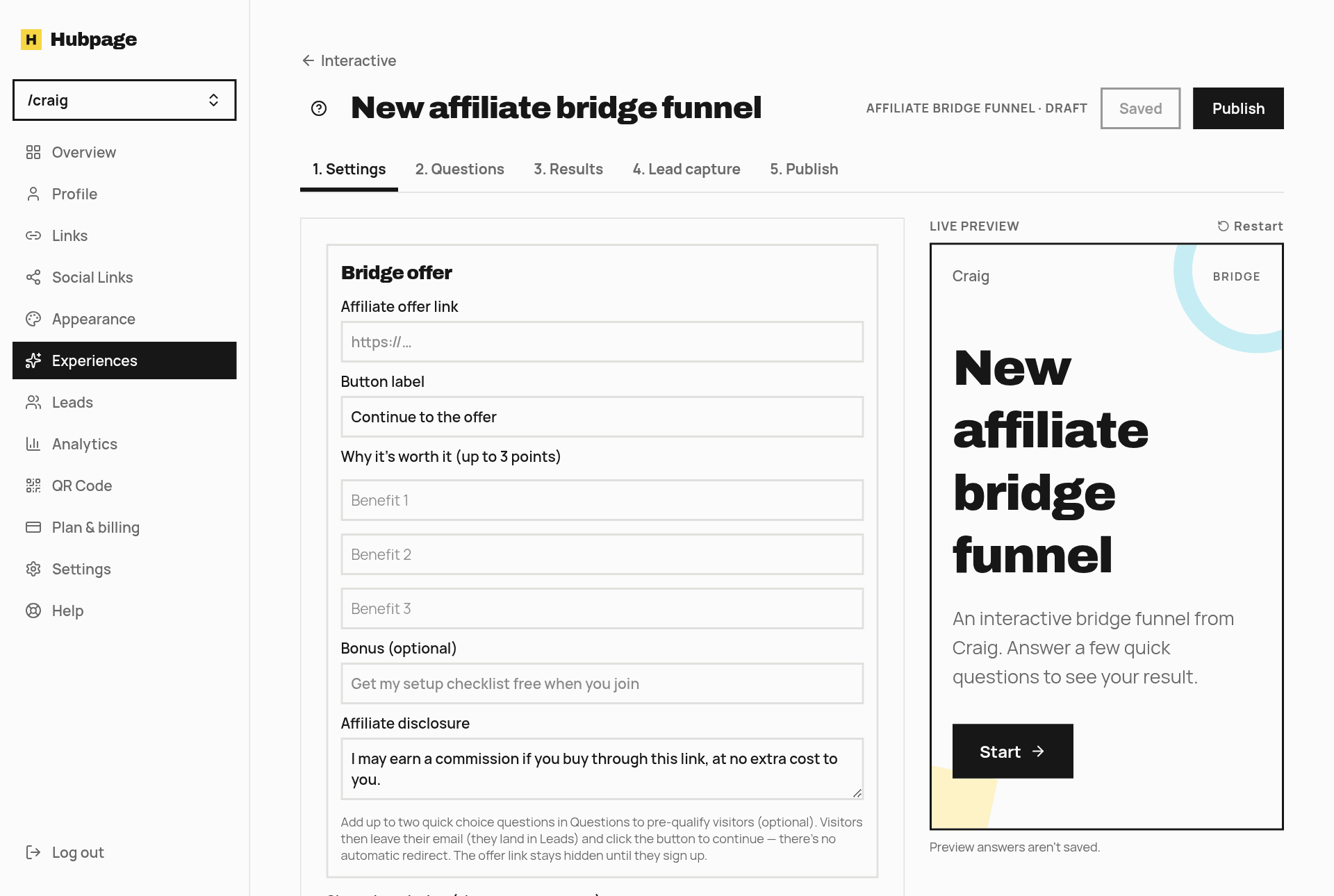
Where: Settings → Bridge offer
Keep the disclosure
Edit the Affiliate disclosure so it is accurate for you. Keep one; it is required in most countries.
Where: Settings → Affiliate disclosure
Add qualifying questions (optional)
In 2. Questions, add up to two single-choice or yes/no questions to pre-qualify visitors.
Where: Builder → 2. Questions
Publish
Publish and share. Sign-ups appear in Leads with their answers.
Where: Builder → Publish
Was this page helpful?