Read your analytics
See profile views, link clicks, unique visitors and click-through rate, which links win, and which sources bring subscribers.
Analytics covers one page at a time. Unique visitors are estimates from anonymous browser sessions; no personal information is collected.
Steps
Open Analytics and pick a range
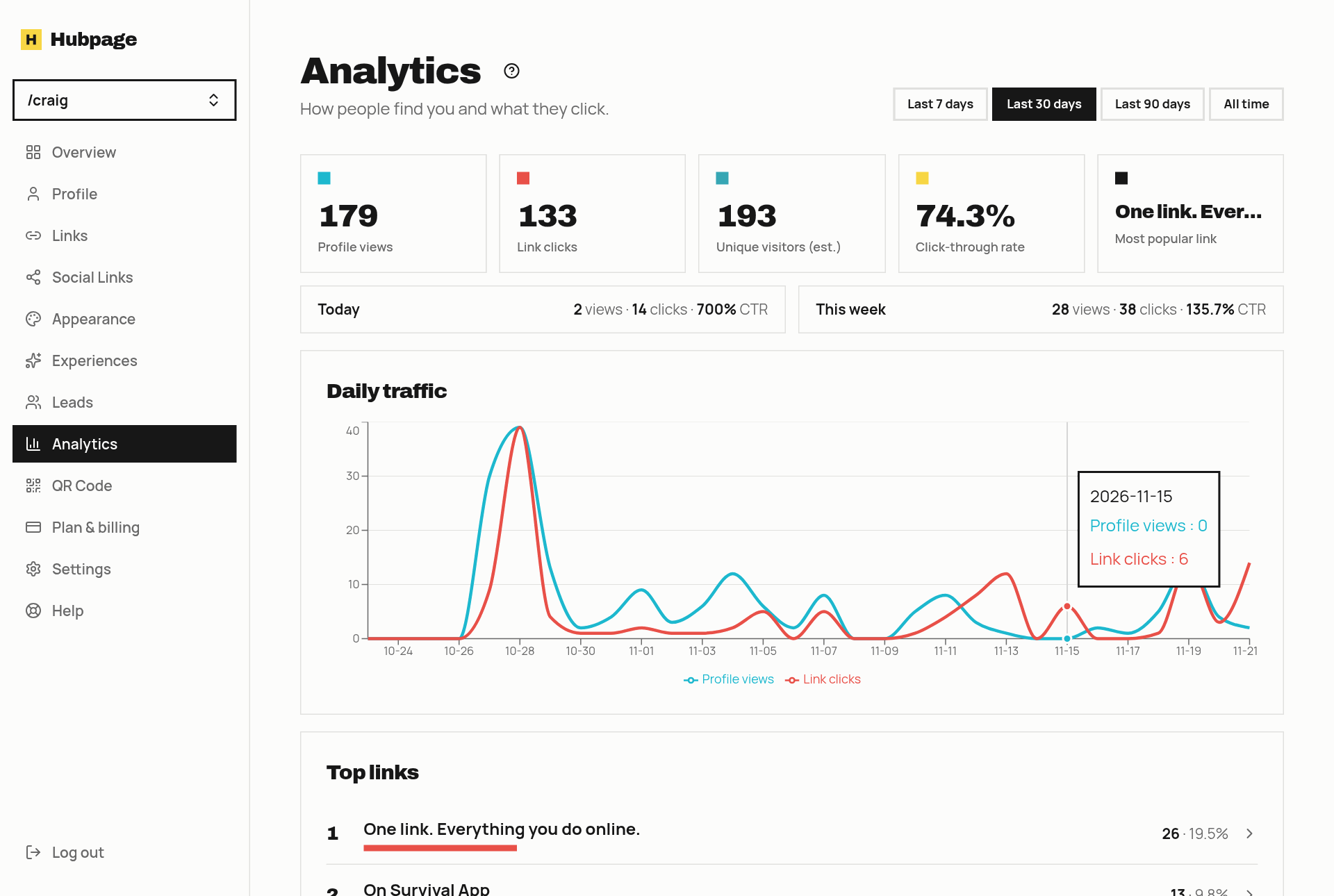
Select Analytics, then 7 days, 30 days, 90 days or All time. The top row shows profile views, link clicks, unique visitors, click-through rate and your most popular link.
Where: Dashboard → Analytics
Check today and this week
Below the stats, Today and This week show views, clicks and CTR side by side. Daily traffic charts views against clicks.
Where: Analytics → Today / This week
Compare links
Top links ranks links by clicks and share. Select one to see its daily clicks and trend (detailed link analytics are on Creator and Pro). Links with no clicks are listed underneath; move them down or remove them.
Where: Analytics → Top links
See where people come from
Where people come from shows visits by source. On Creator and Pro it also shows clicks, subscribers and visit-to-subscriber rate, by source or by campaign. "Direct" means the app or browser did not say where the visitor came from.
Where: Analytics → Where people come from
Was this page helpful?